NEW Portable Cinema? My First Look at RayNeo Air 2
Display glasses from a TV maker: what's in the box, the design, sound, three ways to use them and how the screen looks in my RayNeo Air 2 first look.
 By CasPublished Updated Video + article5 min read
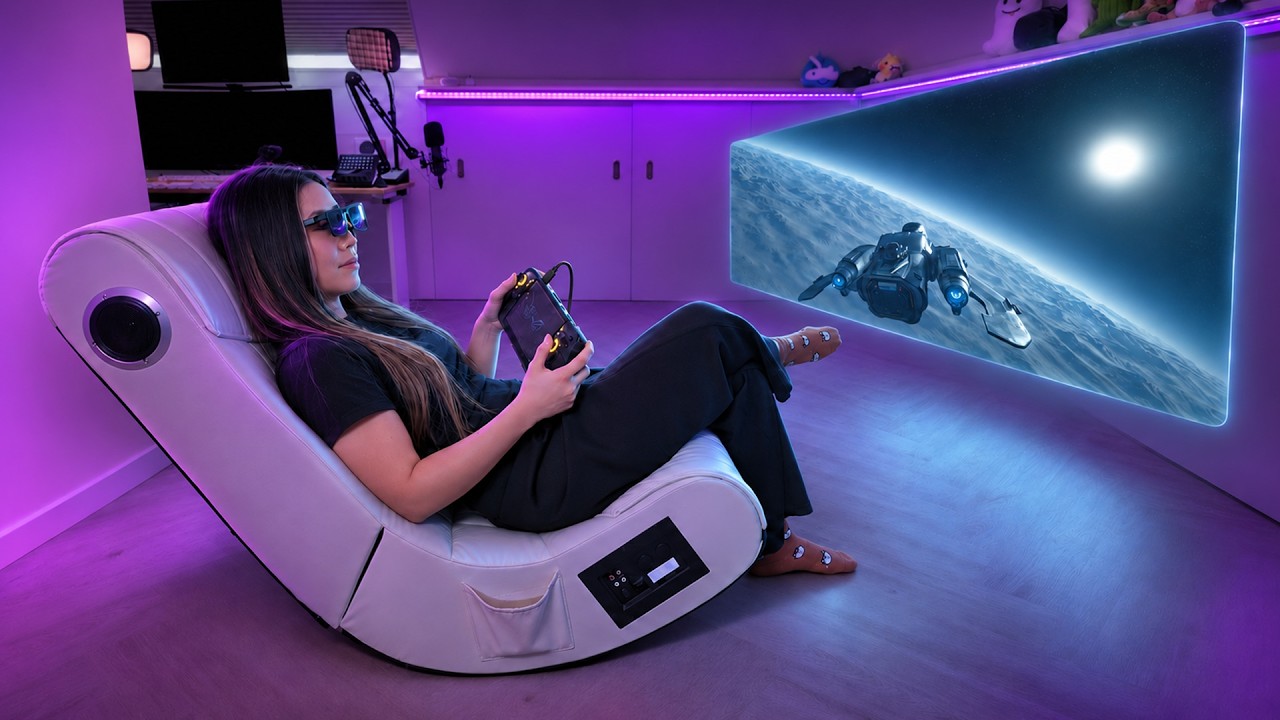
The RayNeo Air 2 looks and feels like a pair of regular sunglasses, but inside are displays, so when you look through them you see a huge TV screen in front of you. I use glasses like this almost daily, for evening gaming on my Nintendo Switch and for binge-watching my favourite YouTubers, mostly because they’re so compact you can take them anywhere. This is my first look at the RayNeo Air 2, before a full review later.
What made me curious is where they come from. RayNeo is incubated by TCL, one of the largest TV manufacturers in the world, and it holds a 28.4% share of China’s consumer AR smart glasses market. TCL sent us the glasses and sponsored this first-impressions video. That pays for our time, not for my opinion.
What’s in the box
The box is minimal. Inside you’ll find:
- The RayNeo Air 2 glasses
- A prescription lens frame
- A protective carrying case
- A cleaning cloth
- A USB-C to USB-C data cable
- The user manual
What’s new compared to the first pair
I haven’t tried the previous generation myself, so I can only go by what RayNeo says has improved:
- A bigger screen, equal to a 201-inch display seen from 6 metres
- Better visual quality
- Optimized for outdoor use
- A higher refresh rate of 120Hz
- A lighter, more ergonomic design
- Better audio
Design and comfort
The front is sleek, shiny hard plastic that looks like regular sunglasses. It also blocks some outside light, so the screens stay visible in bright conditions. We don’t get much sun in Holland in autumn, so I couldn’t test them in really bright sunlight, but outside they did their job. With the displays off you can still see through them, but it’s dim enough that I wouldn’t walk around with them on.
They’re bigger and a bit heavier than normal glasses at around 76 grams (2.7 ounces), but surprisingly comfortable. Two things set the fit apart from other glasses:
- An adjustable nose pad with three fixed positions, instead of several loose nose pieces that get lost (guilty). It’s soft too, with air cushions inside.
- Temples with nine levels of adjustment to fit more face shapes.
Inside it’s the same birdbath optics you see in other glasses, with two micro OLED displays at 1920 x 1080 in 2D and 3840 x 1080 in 3D.
Buttons, 3D and Whisper Mode
Volume is on the left, brightness on the right. Brightness goes up to 600 nits, on par with similar glasses, and RayNeo says it shouldn’t harm your eyes. What’s different is the nine brightness levels. I like how dark it can go for a movie at night.
Shortcuts on the buttons:
- Press both sides together to switch between 2D and 3D. The glasses work as built-in 3D glasses, so a 3D movie plays in stereoscopic 3D without any fuss.
- Switch the refresh rate between 60 and 120Hz.
- Turn on Whisper Mode, which makes the sound a little more muffled but leaks less, so you don’t disturb anyone in a quiet room.
Sound
The speakers are pretty good, and exceptionally loud: louder than similar glasses at max volume. I’ve never struggled to hear other smart glasses, even on a noisy plane, but having more volume is a nice extra. For total privacy you can connect Bluetooth headphones.
Three ways I use the RayNeo Air 2
You connect the glasses to another device with the USB-C cable.
Projection mode: gaming and movies
This shows your phone, PC, console or other device as if it’s on a gigantic screen, and it’s my favourite mode. I game a lot like this on my Switch and Steam Deck. A huge screen in front of me beats bending my neck over a small one, and I can lie on the couch while I play. It also helps when Chary is using the TV for a different game, which happens often: I can play on a big screen without having to fight her.
Your device needs USB-C DisplayPort for this. The Switch doesn’t have it, so it needs an adapter. RayNeo sells a portable dock separately that outputs 1080p, connects the Switch straight to the glasses and charges the Switch at the same time, which not every adapter can do. There’s also an adapter for iOS and other devices without DisplayPort. Check the compatibility list before you buy one.
I also use projection mode for movies and YouTube when I’m away from the TV, like at the dinner table or in bed. Not missing anything while I eat is great, and lying down while watching is hard to beat.
XR mode
Like other glasses, they also have an XR mode with a 3D space system. It adds an ultra-wide screen and lets you install apps like YouTube with features made for the glasses. It only works on certain Android devices with DisplayPort output, and you need the RayNeo XR app.
Multiple screens on a laptop
RayNeo’s software lets you open up to six windows and place them wherever you like. Doing that in a cafe is better for your posture and feels very Minority Report, and nobody will notice. The software is still early, but I think it has a lot of potential and I hope RayNeo keeps updating it. Not every pair of smart glasses has software like this.
How the display looks
The colour range is wide, with rich, vibrant colours and strong contrast. In the mobile app you can even adjust the screen colour to your liking, which I haven’t seen on other glasses.
The clarity isn’t edge to edge, though. There’s some blur and chromatic aberration at the edges, and a sweet spot in the centre where everything is sharpest. Finding it can take some fiddling with the nose pad and temples. That’s not much of a problem for movies or games, but you may notice the blur when reading.
The 120Hz option is great. I haven’t used it much because few of my devices support it, but it works with my laptop and the difference is night and day: the screen follows your head, and at 120Hz moving your head looks much smoother and sharper. Gamers will like that. The field of view is about 46 degrees, similar to other glasses. It feels like a massive screen, but you still see the edges.
My first impressions so far
These glasses aren’t that different from others out there. They do the same thing with almost the same performance, but they’re a little cheaper. I’ll spend more time with them and compare them with other glasses in a later video.
For now I think they’re a great affordable option. There are some compromises to keep the price down, but they do the job: a portable big screen with plenty of ways to use it. If I could tell my younger self I’d one day carry a massive TV in my backpack, I’d have laughed. I’m still amazed this tech exists, and the biggest problem seems to be that most people don’t know it does.